Masterly Font: A Handwritten Typeface for Digital Designers
As a web designer or digital product creator, you understand the importance of typography in shaping user experience and brand perception. Masterly, a dainty and elegant handwritten font, brings a fresh perspective to your design toolkit. With its delicate swashes and natural flow, it adds a personal touch that can elevate everything from headers to hero sections. This Script Amp font is ideal for those who want to infuse warmth and creativity into their digital projects without compromising on clarity.
The Personality of Masterly
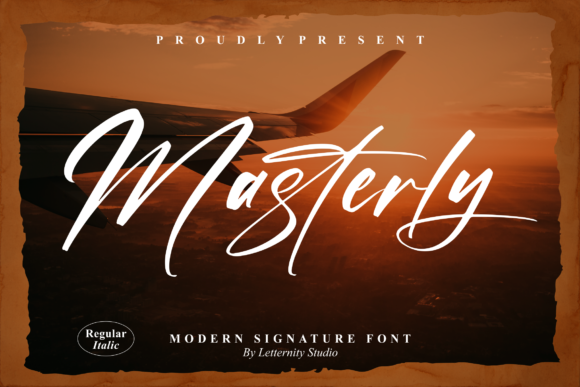
Masterly exudes charm with its soft curves and subtle character variations. It's not just another script font; it’s a thoughtful typeface that balances artistry with legibility. The swashes are refined rather than exaggerated, making it more versatile than many other handwritten fonts. Its personality leans toward sophistication, which means it works well in both creative and professional contexts. Whether you're designing a boutique online store or a SaaS landing page, Masterly can help you create a visual tone that feels authentic and approachable.
When to Use Masterly in Web Design
Masterly shines in display settings where short phrases and headlines take center stage. Here are some of the most effective use cases:
- Hero Sections: Its elegance makes it perfect for greeting users with a welcoming message or tagline.
- Logo Text: For brands that value a personal and handcrafted feel, Masterly can serve as a unique logo font.
- Section Headings: Add a decorative flair to content blocks while maintaining readability.
- Banners & Call-to-Action Areas: Create eye-catching buttons and banners with a premium yet friendly aesthetic.
- Portfolio Sites: Showcase your work with a title font that reflects your creative style.
- Creative Branding Kits: Build consistent visual identities using Masterly for social media graphics, email signatures, and more.
Readability and Responsive Design
While Masterly is a decorative display font, it doesn’t sacrifice usability. On desktop screens, its swashy letters add visual interest without becoming overwhelming. But when it comes to mobile responsiveness, careful consideration is needed. Avoid using it in long paragraphs or small body text—stick to headers, titles, and call-to-action buttons where it will be most impactful.
On smaller buttons, ensure there’s enough padding and contrast to maintain legibility. When using Masterly over images, especially busy ones, overlay it with a semi-transparent background or choose a solid color with high contrast. For dark backgrounds, lighter tones of Masterly can pop beautifully, whereas light backgrounds allow the full range of its ink-like strokes to show through.
Visual Hierarchy and User Engagement
In conversion-focused layouts, typography plays a crucial role in guiding the viewer’s attention. Masterly helps establish a clear visual hierarchy by drawing focus to key elements like headlines, testimonials, or featured products. Its delicate nature encourages a softer scanning behavior, which can be particularly useful in editorial-style websites or content-rich landing pages.
By placing Masterly in strategic areas, such as above-the-fold titles or within feature cards, you can subtly influence how users interact with your site. A well-placed headline in this font can make a coaching website feel more personable or give an online course sales page a sense of intimacy and trustworthiness.
Font Pairing for Balanced Layouts
To keep your designs visually balanced, pair Masterly with a clean sans serif or a traditional serif font. A modern sans serif like Inter or Lato can provide a strong contrast for body copy, ensuring your main message remains easy to read. Alternatively, a classic serif font such as Georgia or Playfair Display can complement Masterly in more editorial or luxury-focused projects.
For instance, on a blog header using Masterly, a simple and neutral body font ensures the reader isn't distracted once they reach the content. In e-commerce environments, pairing it with a bold sans serif for pricing or product highlights can enhance scannability and drive conversions.
Design Applications Across Platforms
Masterly is incredibly flexible across different digital platforms. Here are some practical examples:
- Creative Portfolio Site: Use Masterly for your name, project titles, or taglines to reflect a personal and artistic brand identity.
- Boutique Online Store: Apply it to product categories or promotional banners to create a warm and inviting shopping experience.
- Coaching or Consulting Website: Feature it in hero headlines to build a connection with potential clients and reinforce approachability.
- Product Landing Page: Highlight key benefits or features using Masterly to differentiate them from standard body text.
- Course Sales Page: Make your course title stand out with a font that feels both professional and passionate.
- Digital Ads and Social Graphics: Use Masterly for short, punchy headlines that resonate emotionally with your audience.
Technical Considerations for Web Projects
Before implementing Masterly into your design assets, check what file formats are included. Webfont formats like WOFF and TTF are essential for embedding into websites and apps. If you're working on a responsive layout, confirm that the font includes multiple weights and alternates so you can adjust its appearance for different screen sizes and contexts.
Also consider whether the font supports the languages you need. Multilingual support is increasingly important for global audiences and international branding efforts. And don’t forget about performance—choose only the styles you’ll use to keep load times optimized, especially if you're building a fast-loading online store or landing page.
Licensing for Commercial Projects
If you plan to use Masterly in client projects, online stores, or brand assets, make sure you have the appropriate commercial license. Many premium fonts require specific permissions for web use, app integration, or resale as part of templates. Always verify the licensing terms before deploying it in production environments to avoid legal issues down the line.
Some designers also opt for webfont services that handle licensing automatically. These platforms often include tools for optimizing font delivery and tracking usage, which can be invaluable for larger-scale digital campaigns or multi-author blogs.
Creating Consistency with Masterly
Consistent typography is key to a cohesive brand identity. Once you’ve chosen Masterly for your headers or logos, use it consistently across all design assets. From your website to social media posts, email templates, and even packaging design (if applicable), a unified typographic language strengthens recognition and builds trust.
Use Masterly sparingly in supporting typography to avoid visual clutter. Save it for the most important messages—like your mission statement, product names, or event announcements. Let the rest of your layout breathe with simpler, more functional fonts.
Final Implementation Tips
Here are a few quick tips to maximize Masterly’s effectiveness in your next project:
- Test it at various sizes and on different devices to ensure it maintains its charm and clarity.
- Limit its use to one or two key elements per page to prevent overwhelming the viewer.
- Consider adding slight spacing adjustments to improve its rhythm, especially in tight layouts.
- Pair it with contrasting colors or gradients to make it pop without reducing legibility.
- Use it in combination with other Script Amp fonts for layered typography treatments, but always prioritize usability.
With these considerations in mind, Masterly becomes more than just a pretty script font—it’s a valuable tool in crafting engaging, readable, and memorable digital experiences. Whether you’re aiming for a whimsical creative portfolio or a polished brand-focused landing page, this elegant handwritten typeface has the versatility and appeal to fit right in.
⬇️ Download FreeFree download · No sign-up required🔗 You Might Also Like
Script AmpI recently had the chance to test Beagles on a boutique website I was designing ...Script AmpRecently, I was working on a redesign for a boutique online store that sells han...Script AmpIf you're a crafter, handmade seller, or product designer who values both beauty...Script AmpThere’s something deeply personal about choosing a font. When I recently redesig...Script AmpRecently, I was working on a redesign for a boutique online store that sells han...